How binaural beats work: frequencies, headphones and sessions
Published by VoidWorks Pte. Ltd.Last updated:
A binaural beat is a rhythmic auditory perception produced when each ear receives a slightly different tone. The difference between those tones gives the beat rate; the tones themselves supply the audible pitch. Headphones preserve the separation.
What Are Binaural Beats? A Visual Explanation
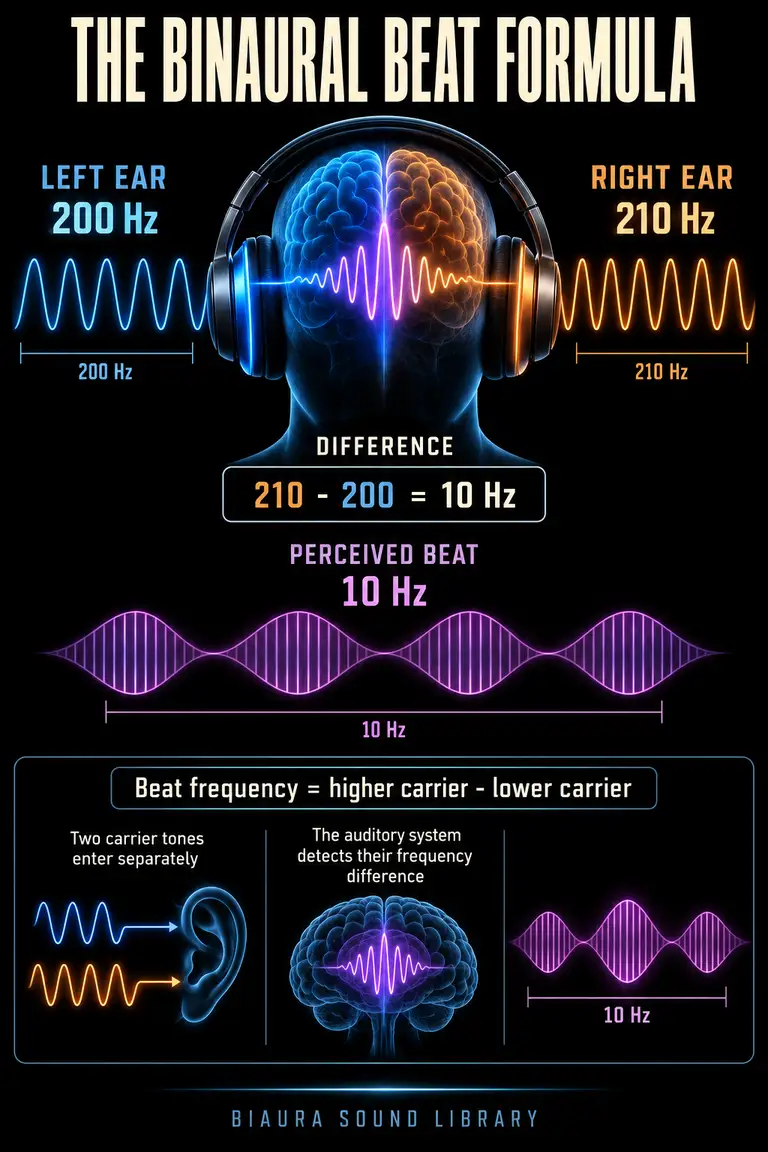
Imagine a steady 200 Hz tone in your left ear and a steady 210 Hz tone in your right. You may perceive a fluctuation at their 10 Hz difference, even though neither ear receives a separate 10 Hz tone. This is why binaural beats are described as a perception arising from two-ear listening.
The listening experience and the question of brainwave entrainment are separate. A systematic review of EEG studies found inconsistent evidence for entrainment.
How Long Should You Listen to Binaural Beats?
For your first trial, choose a short, manageable period while seated somewhere safe and assess comfort before extending it.
Use a timer to define the session rather than checking repeatedly for an effect. For work, pair the trial with one task; for wind-down, pair it with a quiet routine. Stop if the sound feels unpleasant. The listening-duration article offers further context.
Delta, Theta, Alpha, Beta and Gamma Binaural Beats
Delta, theta, alpha, beta and gamma are names for ranges of electrical activity studied with EEG. Audio creators borrow those labels for beat rates. A track labeled alpha might have a 10 Hz difference between its carriers.
Band boundaries vary a little between sources. The usual chart places delta near 0.5–4 Hz, theta 4–8, alpha 8–13, beta 13–30 and gamma above 30. Read the brainwave guide for the recording context behind each band. Use labels to understand a setting, then assess the actual listening experience.
How to Listen to Binaural Beats with Headphones
Use stereo headphones with both earpieces in place. Traditional binaural playback depends on keeping the two carrier tones separate between ears. Mono processing combines the channels and changes that arrangement; a one-ear listening setup also removes the intended two-ear comparison.
Begin with a low comfortable volume. You do not need to make the fluctuation dramatic or overpower background noise. If a headset feels uncomfortable, stop or choose speaker-friendly noise or ambient sound instead. Keep binaural sessions for situations where you can safely turn your attention inward or concentrate; do not use a relaxation session while driving or operating equipment.
How to Use Binaural Beats Throughout the Day
Build sessions around transitions you already have: a short pause before work, a seated meditation break or a wind-down period before bed. The useful structure is the cue and the activity you pair with it.
Choose one sound and one purpose for the session. For a work block, define the next action before pressing play. At bedtime, finish the session if headphones or the sound interfere with settling down. Keep notes about comfort and routine rather than assuming different times of day require particular beat frequencies.
Carrier Tone vs Binaural Beat: What's the Difference?
The carrier is an audible tone. The beat is the difference between the two ears' tones. For example, 200 and 210 Hz create a 10 Hz difference; 400 and 410 Hz create the same difference with a higher pitch region.
You may prefer one pitch region even when the beat rate stays the same. If a tone feels too sharp or heavy, adjust the carrier where the app supports it, keeping the beat constant for a fair comparison. Biaura provides a carrier setting for binaural sounds. Changing carrier pitch does not turn a 10 Hz difference into a 20 Hz one.
Binaural vs Monaural vs Isochronic Tones
Binaural beats separate slightly different tones between ears. Monaural beats combine nearby tones before they reach you, creating a physical amplitude fluctuation in the combined sound. Isochronic tones use repeated changes in a tone's level, often with a distinct on/off quality.
These patterns can share a numeric rate while sounding different. Headphones are important for the traditional binaural arrangement; the other patterns do not rely on one carrier per ear. The three-pattern comparison explains why the construction of a recording matters as much as its frequency label.
What Is Inside a Binaural Beat Track?
A basic binaural signal contains a left carrier and a right carrier. Some recordings add music, ambient sound, spoken guidance, fades or changing frequencies. Those additions can dominate the experience even when the label focuses on a beat number.
Read the description and sample a track before using it for a longer session. Notice whether the pitch stays stable, the balance feels comfortable and any transitions draw attention. Biaura uses separate sound choices rather than requiring you to mix layers. If your aim is a simple repeatable experiment, keep the chosen sound and playback setup consistent while you compare sessions.
How to Choose a Binaural Beat Track
Begin with the activity, then compare comfort. A sound for quiet meditation needs to be easy to return to; a sound for reading should leave room for the words.
Pick one setting, choose a manageable duration and give it an ordinary trial. If it competes with the task, adjust one element or use silence. Repeat a useful setup before looking for another. For a practical routine, Biaura lets you select a binaural sound, set its carrier and duration, and return to a saved preset.
Binaural Beats FAQ: Five Quick Answers
Do I need headphones? Yes, for the traditional binaural separation between ears.
Is the beat rate the pitch? No. The beat is the carrier-frequency difference; the carriers provide the audible pitch.
What does a band name describe? In a binaural track, it identifies the range containing the frequency difference between the two carrier tones.
How should I set volume and duration? Start at a low comfortable level and choose a duration that fits your routine.
Can I use a speaker instead? Choose noise, a pure tone or ambient sound if you want speaker-friendly listening. Speaker playback mixes binaural channels in the room.
The Binaural Beat Formula Explained
The arithmetic is simple: take the absolute difference between the two carrier frequencies. In the pin's example, 210 − 200 = 10 Hz. Swapping left and right still leaves a 10 Hz difference.
Keep three numbers separate when reading a track description: left carrier, right carrier and their difference. A label showing only “10 Hz” usually names the beat, not a tone that a speaker is expected to reproduce at that pitch. If you change both carriers by the same amount, the beat stays unchanged.
Binaural Beat Frequency Chart: Delta to Gamma
| Band label | Common beat-rate range | What the audio label tells you |
|---|---|---|
| Delta | 0.5–4 Hz | A slow difference between carriers |
| Theta | 4–8 Hz | A difference in the theta-named range |
| Alpha | 8–13 Hz | A difference in the alpha-named range |
| Beta | 13–30 Hz | A faster difference rate |
| Gamma | Above 30 Hz | A difference above the usual beta range |
These approximate bands organize frequencies. Biaura also has a 0.25 Hz Deep Sleep sound, below the conventional delta range listed here.
Carrier Frequency vs Binaural Beat Frequency
Keep the gap and the pitch separate. Raising both carriers equally moves the audible tone upward while preserving the beat. Widening the gap changes the beat rate. Moving only one carrier can change both the audible balance and the rate at once.
For a useful personal comparison, hold one variable steady. If you are evaluating pitch comfort, retain the same beat and duration. If you are comparing beat rates, use a similar carrier and a comparable task. That makes it easier to describe what you liked and recreate it later.
Headphones vs Speakers for Binaural Beats
Headphones direct one channel to each ear. Speakers allow both ears to hear both channels, with additional reflections from the room. As a result, a binaural track played through speakers does not preserve the same arrangement as headphone playback.
Check stereo playback and both earpieces before a headphone session. If you prefer speakers for bedtime or find headphones distracting, switch to a sound that suits speakers, such as noise or ambience. There is no need to force a binaural setup into every routine. See headphone and speaker choices for more setup detail.
Choose a Binaural Beat Frequency by Session
For wind-down, try a sound you find gentle and steady. For meditation, choose something you can notice without chasing it. For reading or focused work, assess whether the tone stays out of the way of the task.
Set a defined block and one observable purpose. You might complete a page, sit for ten minutes or finish preparing for bed. Use a low comfortable level, then check how the session went. Biaura's named sounds can simplify the initial choice; your own repeatable experience should decide whether to keep it.
Try your next listening session in Biaura
Biaura is an iPhone sound app with binaural beats, colored noise, pure tones and ambient sounds. Choose one sound, adjust it to a comfortable level, and set a session timer. Explore the sound library or use the download button below to open the App Store.