Healthy listening and headphone comfort
Published by VoidWorks Pte. Ltd.Last updated:
Healthy listening begins with what reaches your ears and how long it lasts. A sound called soothing can still be too loud. A low volume-slider position is not a measurement. Use the ideas below to check the whole setup: the sound, headphones or speaker, room, duration and your own comfort.
Safe Listening Starts With Sound Level and Time
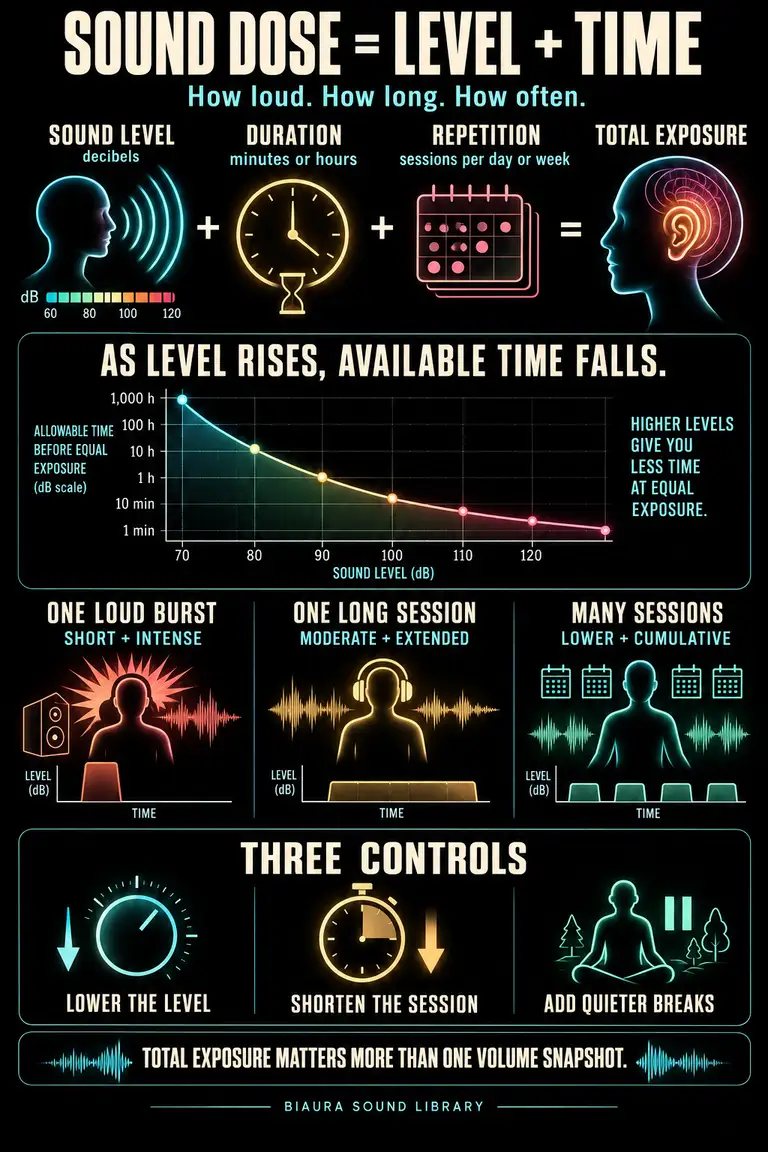
Sound exposure depends on level, duration and how often exposure repeats. Include the commute, calls, music and noisy activities when thinking about your day. NIOSH explains those factors and why susceptibility to hearing damage varies between people.
Make a quick timeline of a typical day. Mark the long listening stretches and the loud places, then choose one practical improvement. That might be a quieter place for a call, less playback on the journey home or a pause between sessions. A background sound should earn its place in that timeline. If it is no longer helping the activity, stop it instead of leaving it running simply because it started earlier.
Decibels Are Logarithmic, Not a Simple Percentage
Decibels express ratios on a logarithmic scale. An increase of about 3 dB doubles sound intensity; a 10 dB increase multiplies it by ten. This is different from saying a sound feels twice as loud. UNSW's explanation of decibels separates physical level from perceived loudness.
Your phone's volume percentage describes a control position. It does not directly tell you the level at your eardrum, because output also depends on the recording, device and headphones. Avoid copying another person's percentage as a target. Begin low whenever you change the sound or playback equipment. If your device provides compatible headphone exposure measurements, use them as additional information alongside sensible control of listening level and duration.
A Practical Weekly Safe-Listening Reference
WHO gives an adult listening reference of 80 dB for up to 40 hours per week, falling to four hours at 90 dB. Those figures show how quickly permissible time decreases as level rises. They are exposure references, not volume goals for a sleep sound or meditation session. WHO's safe-listening guidance provides the complete table.
For everyday background playback, begin quietly and use only the level needed for the situation. Do not aim to spend a weekly allowance, or assume a short quiet break erases earlier loud exposure. If you use exposure tracking, review the whole week rather than checking only a single session that happened to feel comfortable.
Warning Signs Your Ears Need a Break
Ringing, muffled hearing or difficulty understanding speech after loud exposure are reasons to stop the exposure and take the symptoms seriously. Their disappearance does not prove there was no damage. NIDCD's noise-induced hearing loss guidance explains these signs. Persistent or recurring symptoms warrant assessment by a hearing professional. Sudden hearing loss is a medical emergency; seek care immediately.
Do not troubleshoot a new hearing change by turning up tones, playing online hearing challenges or masking the symptom more strongly. Note when it began and what exposure preceded it. For ordinary headphone discomfort without a hearing change, remove the headphones and check their fit before using them again. Listening should not require enduring pain.
Set Headphone Volume for the Environment Around You
A noisy room can tempt you to keep raising playback. First try changing the room, your position or the headphone fit. WHO recommends well-fitted and noise-cancelling headphones to reduce the need for higher volume in noisy settings. Its listening guidance also emphasizes limiting loud exposure.
When the environment changes, check the volume again. A level chosen on public transport may feel excessive once you reach a quiet room. Start your next recording low instead of carrying over the previous setting. Where you need to hear announcements, traffic or another person, choose a setup that preserves that awareness. Adding a louder sound is not the only way to make a difficult environment more manageable.
Headphone Fit, Seal and Isolation Explained
Fit describes how the headphones sit. A seal is the contact that limits sound leakage around an ear tip or cushion. Passive isolation comes from the physical barrier. A poor seal can change the listening experience and the effectiveness of noise cancellation. Apple's ear-tip guidance explains how a compatible fit or seal test can help check suitable tips.
Follow the instructions for your particular model and prioritize comfort. Compare sizes if available; both ears need not use the same size. For over-ear headphones, check cushion condition and whether glasses or hair interfere with contact. Do not push an ear tip deeper just to force isolation. Recheck volume after improving the fit, because the same control position may now sound different.
What Active Noise Cancellation Does and Does Not Do
Active noise cancellation uses microphones and processing to generate an opposing signal that reduces some incoming sound. The result depends on the headphones and listening conditions. It does not guarantee complete silence. Apple's description of active noise cancellation explains the microphone and anti-noise mechanism.
Test it with playback paused so you can tell what the mode itself changes. Then start your chosen recording at a low level. If you still hear an occasional voice or clatter, avoid chasing total silence with more volume. For hazardous environments, use suitable hearing protection and follow the equipment's stated limitations; ordinary consumer noise cancellation is not automatically certified protection for every situation. Keep environmental awareness wherever the setting requires it.
Build Listening Breaks Into a Headphone-Heavy Day
A break works best when it changes what you are exposing your ears to. Moving from a loud call directly to loud music keeps the listening going. WHO recommends breaks between calls, preferably in a quiet setting. Its guidance for virtual work discusses this alongside lower playback levels.
Attach a headphone-free pause to something that already happens: finishing a meeting, getting water or changing tasks. Put the headphones down so the break has a visible start. Review whether background playback is still useful before resuming it. Breaks complement lower levels and shorter exposure; they do not cancel a loud session. If your headphones cause pressure or soreness, address the fit as well as the schedule.
Speakers vs Headphones for Overnight Sleep Sound
Compare comfort, duration and awareness before choosing overnight playback. A speaker lets you create a room background without wearing anything against the ear. Headphones may disturb someone else less, but comfort can change when you lie down. Neither option is automatically safe at any level. NIDCD emphasizes that level, distance and exposure time matter.
Test the setup while awake and in your usual sleeping position. Keep the sound quiet, check whether important alarms remain audible and consider whether you need playback beyond settling down. A familiar rain or noise texture works through a speaker; traditional binaural beats need separate left and right signals through stereo headphones. Choose a different sound if wearing headphones interferes with rest.
A Weekly Healthy-Listening Checklist
Set aside a few minutes to review the week. Look at exposure information your device provides, then remember the noisy activities it may not capture. Note any recurring urge to raise the volume, long stretches without a pause, uncomfortable fit or hearing symptoms. Pick one specific adjustment you can make next week.
For example, move a regular call to a quieter room or begin each sound session with the level lowered. Keep a note of the change so you can check whether it happened. Use Biaura's sound library as one part of a comfortable listening routine.