White, pink and brown noise: a practical listening guide
Published by VoidWorks Pte. Ltd.Last updated:
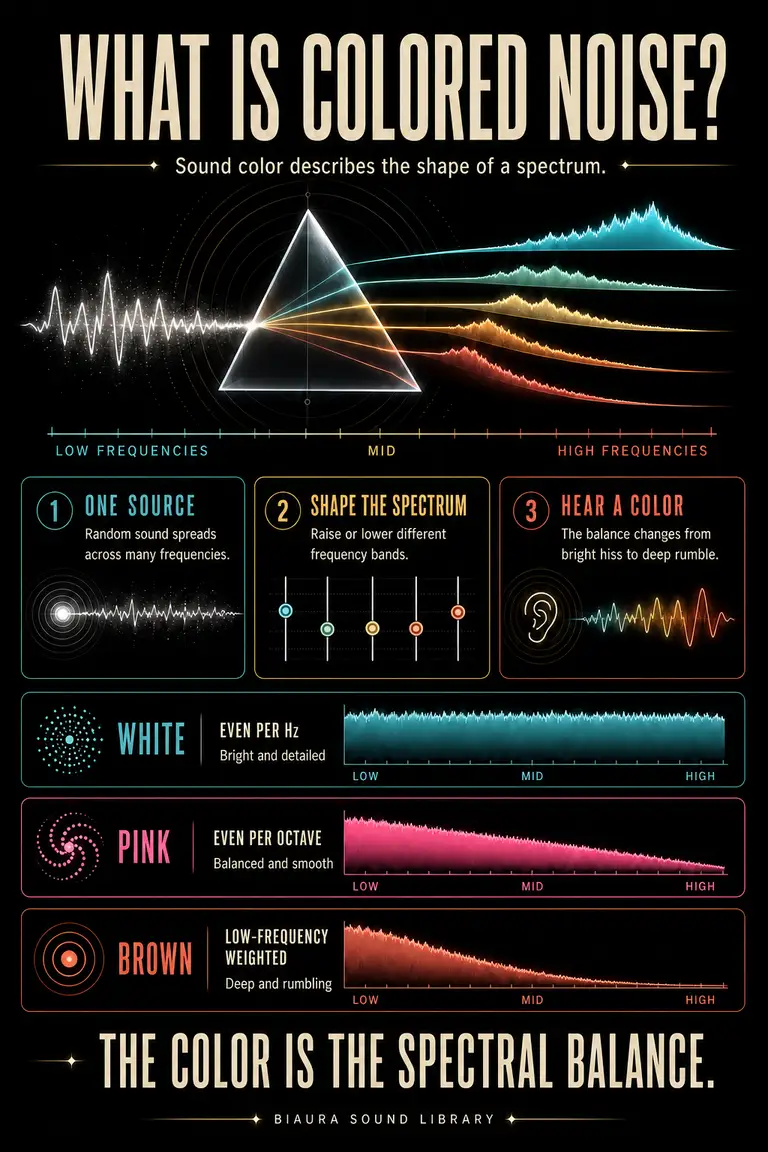
White noise sounds bright, pink noise has a softer high end, and brown noise emphasizes a deep rumble. Their colors describe how sound energy is distributed. The useful choice depends on the distraction, the speaker and your own comfort. This guide explains the charts and gives you small listening comparisons you can try before committing to a longer session.
What Is Colored Noise? Sound Spectrum Explained
Noise contains many frequencies changing together, without a single stable note. Its color describes the balance of that energy across the spectrum. Imagine a graphic equalizer: more upper-frequency energy gives a brighter hiss; more low-frequency energy gives a deeper wash.
The standard mathematical models use a flat power spectrum for white noise, a 1/f spectrum for pink, and a 1/f² spectrum for brown. MathWorks' colored-noise reference explains these models. In practice, speakers and filters limit the range you actually hear.
White vs Pink vs Brown vs Green vs Dark Noise
| Color | Usual character | What to listen for |
|---|---|---|
| White | Bright, broad hiss | Whether upper-frequency detail feels intrusive |
| Pink | Softer, balanced wash | Whether it covers distractions comfortably |
| Brown | Deep, bass-weighted rumble | Whether your speaker reproduces the low end |
| Green | Often a midrange-focused sound | The particular creator's definition |
| Dark | Usually a softer, reduced-high-end texture | The actual sound rather than the label |
Green and dark are less standardized names than white, pink and brown. Two apps may use different spectra under the same name. Compare at a similar comfortable perceived level; keeping the volume slider identical does not guarantee equal loudness.
How Colored Noise Masks Distracting Sounds
Masking adds a background against which another sound becomes less distinct. A low steady wash can make an occasional keyboard click less prominent or make a conversation harder to follow. It does not remove the original sound from the room.
Start by reducing the distraction itself: close a door, move away from a television or choose a quieter position. Then test a gentle background if needed. Listen for whether the distraction pulls your attention less often. If you must keep raising the level, change position or approach instead. The sound-masking guide covers speech, travel and room placement in more detail.
White Noise Explained: Spectrum, Sound and Uses
White noise has a bright hiss because its energy is spread evenly across equal-width frequency intervals. That makes it a useful comparison when the distraction includes light clatter or crisp speech sounds, but the extra brightness can also become the thing you notice.
Try a short reading passage with white noise at a low level. Notice both the original distraction and the hiss. If the words outside the room become less distinct but the hiss feels tiring, compare pink noise next. Keep the task and speaker position the same. A successful background is one you can leave alone while you work.
Pink Noise Explained: A Smoother Broadband Sound
Pink noise has less high-frequency emphasis than white noise. Many listeners describe it as smoother, though the experience depends on your hearing and playback device. Its balanced wash can be a useful first comparison when white feels sharp and brown feels too heavy.
Use the same task for each trial, then compare whether you reread less or find the background easier to ignore. Give yourself a quiet interval between sounds so you notice the difference. See the pink-noise listening guide for a structured test.
Brown Noise Explained: Why It Sounds So Deep
Brown noise gives more weight to low frequencies, so the result resembles a soft rumble. That character is easiest to hear on equipment that can reproduce bass. On a small phone speaker, the same signal can sound unexpectedly thin.
A deeper sound is not automatically a better mask. Speech has detail across a wide range, and a bass-heavy background may leave the words clear. Compare brown with pink if conversation is the main distraction. If the issue is low engine noise, first check whether reducing that noise or moving helps. The brown-noise guide explains the equipment and room effects.
Green Noise vs Dark Noise: What's the Difference?
Green noise is often used for a midrange emphasis, while dark noise usually suggests softened highs or a low-weighted texture. Neither name gives you a universally agreed curve. Read the description and listen to the particular recording or generator.
For a useful comparison, write down what you hear: sharp or soft, thin or full, steady or changing. Those observations transfer between products better than color names. Biaura includes both green and dark noise. Compare their actual textures at a comfortable level.
How Loud Should White, Pink or Brown Noise Be?
Use the lowest level that makes the background useful. You should not need to make every outside sound disappear. A device volume percentage is not a sound-level measurement: headphones, speakers and distance all change what reaches your ears.
Check the sound from the place where you will listen, then turn it down a little and see whether it still helps. Keep alarms and necessary communication audible. Loudness and duration both matter for hearing; NIDCD explains how noise exposure can damage hearing. If listening becomes uncomfortable, stop and reassess rather than increasing the level or switching to a harsher color.
How to Use Colored Noise for Sleep
Start with the bedroom itself. Reduce avoidable noise, then listen from your pillow position before adding anything. If the room is already quiet, there may be no reason to play a background. If specific interruptions stand out, compare one gentle sound during a wind-down period.
Keep a speaker uncovered and away from the pillow. Try a timer first, and compare several ordinary mornings rather than assuming a quieter-feeling room means better sleep. Continuous pink noise reduced REM sleep in one 2026 laboratory study. Your listening routine should earn its place.
How to Use Colored Noise for Focus
Choose one concrete task before choosing the sound: read two pages, outline an email or work through a practice question. Start briefly in silence, then repeat with one noise color at a low level. Check progress and comfort, not whether the sound feels impressive.
If speech remains easy to follow, compare a slightly brighter color or move farther from the conversation. If the background competes with your inner voice, reduce it or return to quiet. Save the combination that was useful so the next work block does not begin with another search. Biaura lets you select a sound and a session timer for a repeatable setup.
White vs Pink vs Brown Noise for Sleep
The best starting point is the bedroom you have. White is brighter, pink gentler at the top, and brown deeper. Compare the sound at your actual resting position, because bass and brightness can change across a room.
First reduce unwanted noise; if you still want a background, try a brief, quiet wind-down session. Note comfort, awakenings and next-day restfulness across a few nights. Stop using a sound that seems to worsen sleep. The sleep science guide explains why continuous background audio differs from timed laboratory stimulation.
White Noise vs Pink Noise for Focus
White and pink are useful alternatives when the same background needs a different brightness. Choose white if its broad hiss comfortably blurs the distracting detail. Choose pink if white becomes too noticeable.
Compare five minutes of the same kind of work with each sound. Keep the room, device and task similar, and adjust for a comparable comfortable loudness rather than matching slider positions. Record one useful outcome, such as completed paragraphs or fewer breaks in attention. If both conditions feel worse than quiet, use quiet. The test is about making your environment easier to work in.
Fan vs Rain vs Colored Noise: What Changes?
A fan mixes airflow noise with mechanical tones; its pitch and texture depend on the appliance. Rain includes small changes, impacts and sometimes larger events. Synthesized colored noise offers a more uniform texture. Any of the three can feel pleasant or distracting depending on the listener.
Listen for what repeats or jumps out. A rattling fan, a conspicuous loop or a sudden thunderclap may draw more attention than a steady wash. For sleep, sample a recording long enough to hear its louder moments before leaving it running. For focus, choose the version that stays in the background during the task you actually need to finish.
Match a Noise Color to the Distraction
Start with the part of the distraction you notice. Is it low rumble, sharp clicks, intelligible words or a mixture? Brown or pink may be worth comparing for low rumble; white or pink may provide more overlap with speech detail and clatter.
Change one variable at a time. Move the speaker before raising the volume. Compare another color before deciding you need a louder background. If your room has strong bass vibration, audio may be a poor solution because adding sound does not remove physical vibration. Address the source or try another location when possible.
Colored Noise Spectrum Cheat Sheet
| Noise | Power spectral density | Approximate slope as frequency doubles |
|---|---|---|
| White | Constant | 0 dB per octave |
| Pink | Proportional to 1/f | −3 dB per octave |
| Brown | Proportional to 1/f² | −6 dB per octave |
The slope describes the power density, not how much to turn a volume control. Pink distributes similar energy across equal-ratio octave bands, while white has more total energy in wider, higher octaves. Real playback adds the response of the speaker, headphones and room. Use the chart to understand why two colors differ, then use your ears to choose a comfortable level.
Try your next listening session in Biaura
Biaura is an iPhone sound app with binaural beats, colored noise, pure tones and ambient sounds. Choose one sound, adjust it to a comfortable level, and set a session timer. Explore the sound library or use the download button below to open the App Store.